Favicon size
Favicon ICO Size: What Size Should a Favicon Be?
Build an ICO with 16 × 16, 32 × 32, and 48 × 48 entries, then create PNG files at 180 × 180, 192 × 192, and 512 × 512. There is no single official favicon size because platforms use icons in different places. Compare the platform requirements in the table below, then use the browser-only generator to download the files.
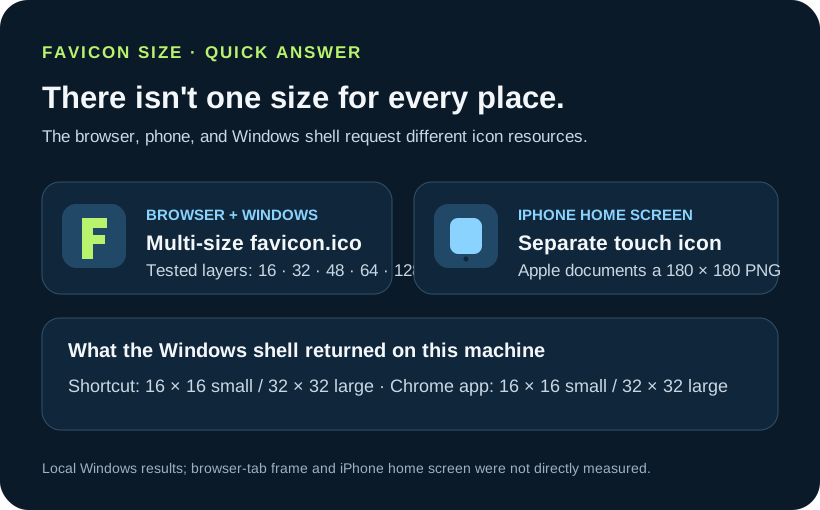
Use destination-specific files rather than one universal size: this page's generator creates one ICO containing 16 × 16, 32 × 32, and 48 × 48 entries, plus separate PNGs at 180 × 180, 192 × 192, and 512 × 512. The Windows measurements below describe this test machine, not every browser or device.
This diagram separates the six tested ICO layers and measured Windows requests from the separate iPhone touch icon.
Test scope: Windows 11 build 28000 at 96 DPI, Chrome 154.0.8037.97, a local test page, a generated multi-layer ICO, Windows Shell APIs, and the installed Chrome executable. Chrome tab icon rendering and bookmark-bar icon rendering were not measured. No physical iPhone was available, so the iPhone home-screen icon was not measured; its 180 x 180 px value below is quoted as an official Apple specification only.
What live Shopify, Wix, and Squarespace sites actually serve
Snapshot measured 2026-10-23. I opened six public Shopify example sites, five Wix showcase sites, and six Squarespace showcase sites; on each page I fetched the declared rel=icon or rel=shortcut icon resource and measured the response bytes, actual file format, and pixel dimensions from the file data. The linked showcase pages explain how the sample sites were found. These are public-site samples, not a random platform survey.
No platform dashboard upload was tested in this run, so the original uploaded images are unknown. These measurements show the favicon files currently served to visitors; they cannot establish how a platform resized a particular upload, whether it imposed a cap, or which dimensions a specific account will publish.
Shopify public-site sample: 6 sites
Four of the six sampled sites linked at least one 32 × 32 asset. The other observations include a 96 × 90 PNG and a 256 × 253 ICO entry; one site also linked 16 × 16 and 32 × 32 PNGs alongside an ICO. This sample does not support a single Shopify-wide output size or upload cap. Sites were selected from Shopify Examples.
| Public page / fetched resource | Actual response file | Pixel dimensions | Bytes |
|---|---|---|---|
| Mollyjogger · icon | PNG | 32 × 32 | 509 |
| Deny Designs · icon | PNG response at a .ico URL | 32 × 32 | 566 |
| DOWSE · icon | PNG | 32 × 32 | 1,922 |
| The Citizenry · icon | PNG | 96 × 90 | 4,844 |
| HORNE · 32 px icon | PNG | 32 × 32 | 241 |
| HORNE · 16 px icon | PNG | 16 × 16 | 233 |
| HORNE · ICO | ICO, 1 entry | 16 × 16 | 1,150 |
| Poly & Bark · SVG | SVG; intrinsic size 1,796 × 1,778 | 1,796 × 1,778 | 254,784 |
| Poly & Bark · ICO | ICO, 1 entry | 256 × 253 | 267,230 |


Wix public-site sample: 5 sites
Four of five sampled pages served separate raster icon resources at 192 × 192 and 32 × 32. The fifth linked the same SVG for its icon declarations; that SVG has a viewBox but no intrinsic pixel width or height. A sizes=192x192 HTML declaration alone is not proof of raster dimensions, so each linked file below was fetched and inspected. Sites were selected from Wix website examples.
| Public page / fetched resource | Actual response file | Pixel dimensions | Bytes |
|---|---|---|---|
| Puffin Packaging · icon SVG | SVG; intrinsic pixel dimensions not specified; viewBox 0 0 246.17 252 | Not specified | 5,099 |
| Hedof · 192 px icon | PNG | 192 × 192 | 11,398 |
| Hedof · 32 px shortcut icon | PNG | 32 × 32 | 1,833 |
| Daniel Aristizabal · 192 px icon | JPEG | 192 × 192 | 9,898 |
| Daniel Aristizabal · 32 px shortcut icon | JPEG | 32 × 32 | 1,338 |
| Sonja van Duelmen · 192 px icon | JPEG | 192 × 192 | 10,289 |
| Sonja van Duelmen · 32 px shortcut icon | JPEG | 32 × 32 | 1,259 |
| Generation She · 192 px icon | PNG | 192 × 192 | 11,347 |
| Generation She · 32 px shortcut icon | PNG | 32 × 32 | 1,640 |


Squarespace public-site sample: 6 sites
The six fetched resources did not share one pixel size. Two returned a 100 × 100 image, one returned a 192 × 192 PNG, one a 48 × 48 WebP, one a 100 × 83 PNG, and one ICO containing 16 × 16 and 32 × 32 entries. Five of the six resources returned PNG or WebP bytes even though the page declared an image/x-icon type or used an .ico URL. Sites were selected from the Squarespace Showcase.
| Public page / fetched resource | Actual response file | Pixel dimensions | Bytes |
|---|---|---|---|
| Sam Frésquez · icon | PNG | 100 × 100 | 365 |
| Andamiro Brooklyn · icon | ICO, 2 entries | 16 × 16; 32 × 32 | 6,518 |
| Hello-World · icon | PNG | 192 × 192 | 37,955 |
| Yarza Twins · icon | WebP | 100 × 100 | 11,298 |
| Myrtle Village Green · icon | WebP | 48 × 48 | 1,136 |
| LittleRipper.la · icon | PNG | 100 × 83 | 1,348 |
Practical takeaway: inspect the file bytes that the page actually links to. A filename ending in .ico and a sizes attribute can disagree with the response format or its measured dimensions. To learn what your own account does to a 48 × 48 upload, upload that test image in the platform dashboard and fetch the published resource; these public samples cannot answer that upload-specific question.
One icon can be requested at different sizes
The phrase favicon size can mean the dimensions stored in an image file, the entry a program asks Windows to extract, or the tiny mark drawn inside a browser control. Those are related measurements, but they are not the same measurement. A 256-pixel source does not mean that a tab displays a 256-pixel icon, and a tab preview cannot tell you what the Windows shell will choose for a shortcut.
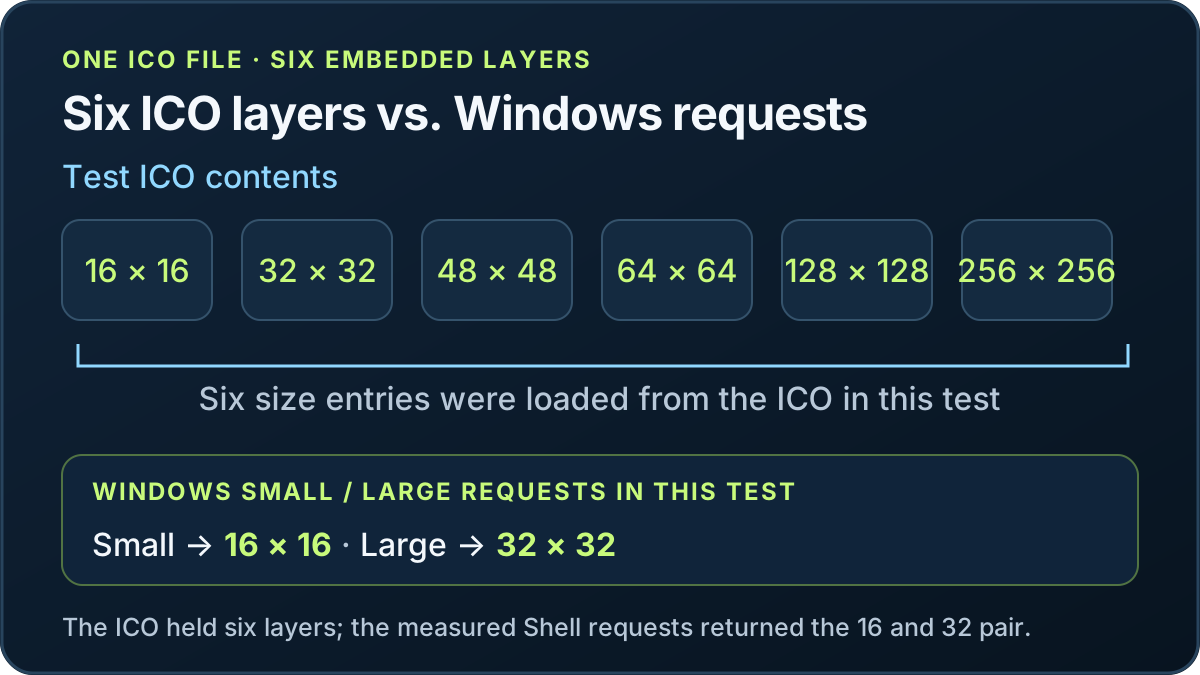
I made one transparent test mark with a different background color at each size, then packed the 16, 32, 48, 64, 128, and 256 pixel versions into one ICO. The colors let me identify the source layer if a measured surface reports one. I served that file from a local page, opened the page in Chrome, and confirmed that Chrome requested favicon.ico. The rendered icon size in the Chrome tab was not measured. The rendered icon size in the bookmark bar was not measured.
| Destination | What this run measured | Result and basis |
|---|---|---|
| Browser tab | Not measured. | Chrome requested the declared favicon.ico resource; the rendered tab icon size was not captured. |
| Bookmark bar | Not measured. | No independent bookmark-bar pixel capture was available. |
| iPhone home screen | Not measured. | Apple’s official Safari Web Content Guide, “Configuring Web Applications,” includes this example: <link rel="apple-touch-icon" sizes="180x180" href="touch-icon-iphone-retina.png">. This is an example in Apple’s documentation, not a measurement by this site; the iPhone home-screen icon was not measured. Source: https://developer.apple.com/library/archive/documentation/AppleApplications/Reference/SafariWebContent/ConfiguringWebApplications/ConfiguringWebApplications.html |
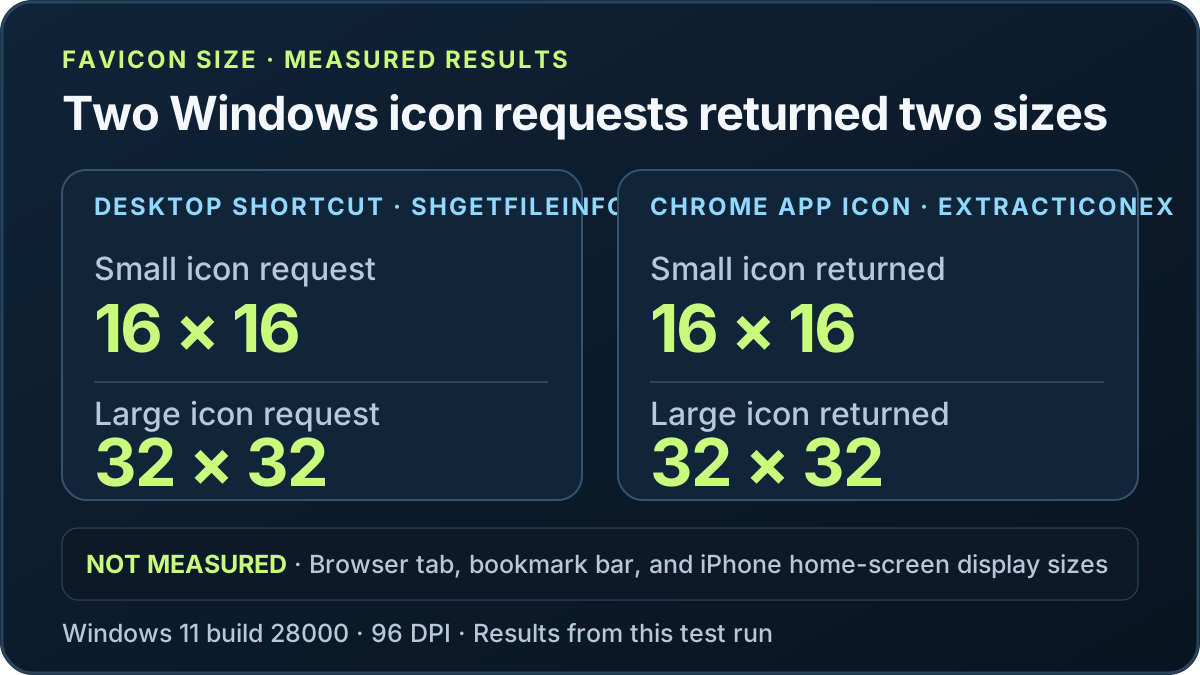
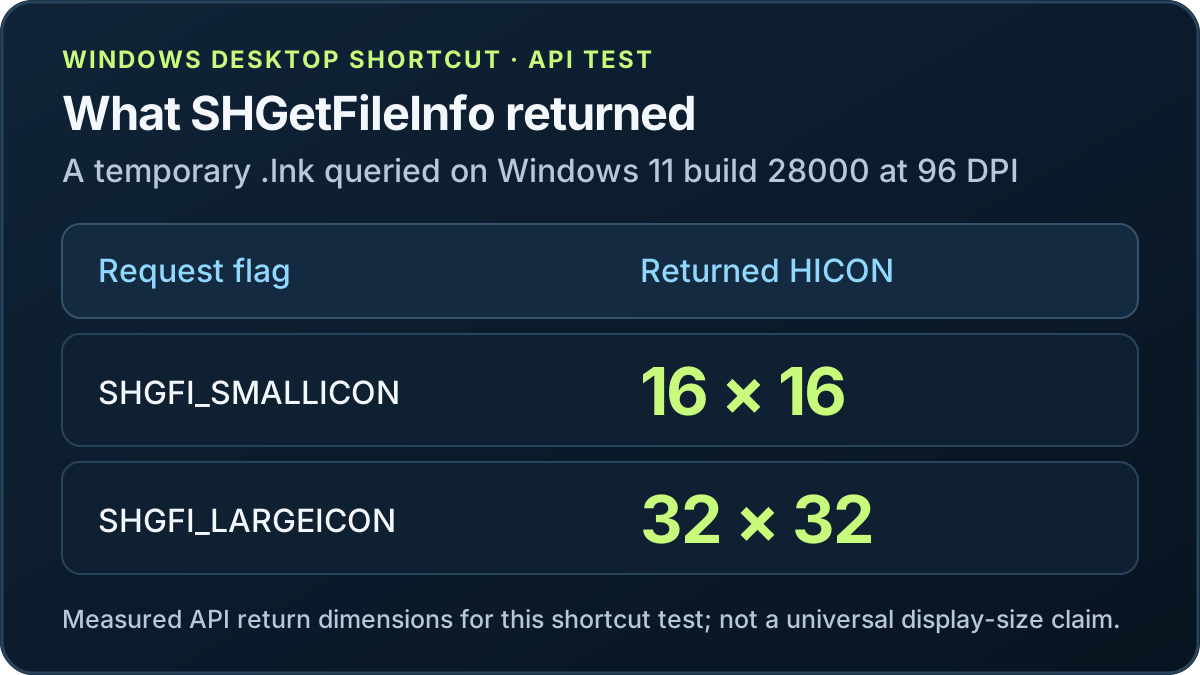
| Windows desktop shortcut | Windows SHGetFileInfo queried the temporary .lnk at small and large icon sizes. | Returned HICONs were 16 × 16 for SHGFI_SMALLICON and 32 × 32 for SHGFI_LARGEICON at 96 DPI. Explorer view and display scaling can request other sizes. |
| Windows application icon | Windows ExtractIconEx queried the installed Chrome executable; LoadImage also opened the test ICO at six requested dimensions. | Chrome returned 16 × 16 small and 32 × 32 large icons. The test ICO loaded at 16, 32, 48, 64, 128, and 256 pixels. These are measurements for this executable, file, API, and machine. |
For a browser and Windows-oriented site icon, a multi-resolution `favicon.ico` gives Windows several native layers to choose from. In this sample, Windows 11 build 28000 at 96 DPI returned 16 × 16 and 32 × 32 for small and large icon requests, and the six ICO sizes opened successfully through Windows image loading. Microsoft Win32 guidance also describes common application icon resources. The measured Shell requests and the file’s available layers are different facts.
For an iPhone home-screen web clip, Apple’s official Safari Web Content Guide, “Configuring Web Applications,” gives this example: <link rel="apple-touch-icon" sizes="180x180" href="touch-icon-iphone-retina.png">. This is an example in Apple’s documentation, not a measurement by this site; the iPhone home-screen icon was not measured. Source: https://developer.apple.com/library/archive/documentation/AppleApplications/Reference/SafariWebContent/ConfiguringWebApplications/ConfiguringWebApplications.html
The Apple example identifies an apple-touch-icon PNG separately from an ICO. This test did not measure that icon on an iPhone home screen.
The recommendation from this run is therefore conditional: make a multi-size ICO for the browser/Windows use case, and add a separate Apple touch PNG if people will save the site to an iPhone home screen. If you support an installable web app, its manifest icons are another destination and should be checked separately. There is no one favicon dimension that can stand in for every file and every display context.
The Windows Shell API returned 16 × 16 and 32 × 32 handles for the small and large requests on Windows 11 build 28000 at 96 DPI. The Chrome application executable returned the same pair through `ExtractIconEx`. Those results do not provide a measured Chrome tab rendering size, bookmark-bar rendering size, or iPhone home-screen result.
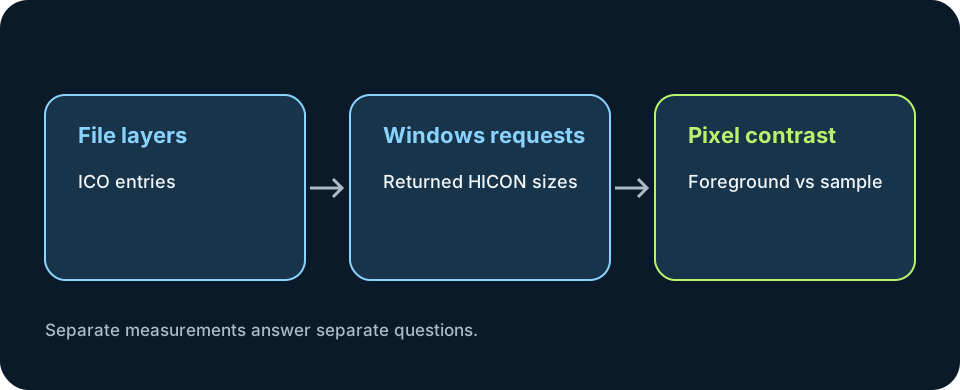
Open the downloaded file with an ICO-aware viewer or inspect its directory entries. A filename ending in .ico does not prove which layers it contains. The sample below is a real multi-frame ICO generated for this page's Windows test; its directory lists the six tested sizes; the Windows app icon from PNG workflow uses that same saved-file check for an app destination.
My results are intentionally bounded. The Shell API's 16 × 16 and 32 × 32 handles describe the small and large requests made on this Windows installation at 96 DPI. They do not promise that every screen, scaling setting, browser, or shortcut view will show a glyph at that physical pixel size. Likewise, seeing Chrome request favicon.ico does not reveal which embedded frame it paints in a hidden browser toolbar.
For finding an Apple Touch Icon, see the [finding an Apple Touch Icon](apple-touch-icon).
For a broader map of favicon files, page markup, and platform-specific checks, start with the favicon overview.
How to check favicon ICO size inside a downloaded package
A package's file count and an ICO's internal image count answer different questions. In the 2026-10-18 benchmark, I inspected the downloaded ZIP entries, extracted its favicon.ico, and read that ICO's directory separately. This is one default-flow sample; Chrome 155.0.8059.84 was recorded, while the operating-system version was not recorded in the benchmark notes.
| What was inspected | Measured result in this sample |
|---|---|
| Downloaded ZIP | favicon-generator-org-output.zip, 116,772 bytes. |
| ZIP contents | 27 entries: 24 PNG files, one ICO, one manifest, and one browserconfig file. |
favicon.ico directory | One image entry at 16 × 16 pixels; the larger size variants were separate PNG files. |
| Transparency spot check | The measured top-left pixel was RGBA 0, 0, 0, 0 in the ICO and measured PNGs; this is a single-input result. |
To verify a package for your own use, count the archive entries, extract the actual .ico, then inspect its internal image entries and dimensions. Do not infer the ICO's layer count from the ZIP total or from the dimensions of neighboring PNG files. The full ten-tool sample table and its test limits are in the site icon generator benchmark.
- Count the files in the downloaded archive by format.
- Open the extracted
.icowith an ICO-aware inspector and read its directory entries. - Compare those entries with the sizes your destination needs; treat separate PNG exports as separate files.
Favicon ICO size and favicon requirements
For a Google Search favicon, use an image larger than 48 × 48 pixels; Google’s minimum is 8 × 8 pixels.
A website favicon ICO can contain multiple image entries, but the Microsoft ICO structure reference cited here does not set a required number of entries for a website favicon. The reference describes the ICO directory and its image entries; it does not define one layer count that every site must use.
For Windows Shell destinations, Microsoft documents these request sizes: 16 × 16 for Explorer list/details, common dialogs, and title bars; 32 × 32 for Explorer medium icons and dialogs; 48 × 48 for Explorer large icons and the desktop; and 256 × 256 for Explorer extra-large icons. These are Windows Shell scenarios, not a rule for which ICO layer a browser tab must display.
There is no official total-byte target for a website favicon ICO in the Microsoft sources cited on this page. The Microsoft ICO structure reference records the byte length of each image entry, but it does not specify a universal maximum total file size for website favicons; inspect the generated file and check any destination-specific upload limit separately.
Official favicon and web app icon size references
These official references cover different destinations, not one shared favicon requirement. The Apple page is an archived developer guide; its examples are identified as Apple Web Clip guidance. Retrieved 2026-10-21.
| Platform / destination | Dimensions | Format | Where it applies | Official documentation |
|---|---|---|---|---|
HTML browser icon (rel=icon) | The HTML Standard defines a sizes attribute for describing icon dimensions; it does not prescribe one universal favicon pixel size. | The format is the linked icon resource's format; the standard section does not set one universal format. | A document icon selected by the user agent from its declared icon links. | WHATWG HTML Standard — `rel=icon` (retrieved 2026-10-21) |
| Google Search result favicon | Square, at least 8 × 8; Google recommends larger than 48 × 48. | BMP, GIF, ICO, PNG, JPEG, PPM, or TIFF. | The favicon eligible to appear beside a site's Google organic search result. | Google Search Central — Favicon guidelines (retrieved 2026-10-21) |
| Apple iOS Home Screen Web Clip | Apple's archived guide gives separate examples including 152 × 152, 167 × 167, and 180 × 180 for device resolutions. | PNG (apple-touch-icon). | The icon shown when a webpage is added to an iOS Home Screen as a Web Clip. | Apple Safari Web Content Guide — Specifying a Webpage Icon for Web Clip (retrieved 2026-10-21) |
| Chromium installable web app (manifest) | 192 × 192 and 512 × 512 icons are sufficient for most Chrome splash-screen cases; Chrome may choose a closer match if more are provided. | PNG examples in the web app manifest. | Icons declared in a Progressive Web App manifest and used for Chrome's mobile splash screen. | web.dev — Add a web app manifest, splash-screen icons (retrieved 2026-10-21) |
| Windows app and Shell icons / ICO container | Microsoft describes standard multi-image icon resources at 16 × 16, 32 × 32, 48 × 48, and 256 × 256; Shell requests vary by view and DPI. This generator's ICO includes the first three, not 256. | A Windows .ico resource can contain multiple images. | Windows app resources and Shell surfaces such as Explorer views, dialogs, and title bars; this is not a browser-tab size rule. | Microsoft Learn — About Icons (retrieved 2026-10-21) |
What is the best favicon size?
There is no single best favicon pixel size for every destination. For favicon requirements, choose the row in the official reference table that matches the surface: Google Search's favicon guidance describes search-result eligibility, Apple's Web Clip guidance gives iOS home-screen examples, and Microsoft's Windows Shell guidance describes Windows icon requests. They are separate use cases, not a universal browser-tab requirement. If you searched for faicon size, use the same destination-specific distinction; it is not a separate icon format.
Favicon image, icon, and logo dimensions
Dimensions for a favicon image and dimensions of a favicon ask two different things: the pixel entries stored in the file, or the rendered mark in a browser or system surface. The ICO sample on this page contains six tested layers. In this page's Windows test, the Shell returned the small and large request sizes recorded above; Microsoft's Shell reference describes those Windows use cases, while the Chrome tab's painted pixel size was not measured. A logo exported as a favicon still needs to be judged against its actual destination, so do not treat a source canvas dimension as proof of the rendered icon size.
Is 16 × 16 always the right favicon pixel size?
No. In this page's test, 16 × 16 was one embedded ICO layer and the Windows Shell's small-icon request result at 96 DPI; that does not establish a universal favicon display size. Google Search's separate guidance says at least 8 × 8 and recommends an image larger than 48 × 48 for its search-result favicon. Use that source for the search-result surface and keep the browser-tab rendering result marked as not measured.
What favicon size does Squarespace require?
This page does not contain a Squarespace-specific official size rule or a Squarespace upload test, so it cannot give a Squarespace-specific number or settings path. The Apple, Google, and Microsoft references above describe their own documented surfaces; they do not establish what Squarespace accepts or displays. Treat the Squarespace requirement as unverified here rather than borrowing a size from another platform.
After choosing a destination and size, create a favicon from your prepared artwork, then add its public file URL to your page.
If the size is correct but one browser or device still shows no icon, use the can someone help with favicon checklist to separate the affected surface.
After choosing the file dimensions, add the file reference with the favicon html instructions for the deployed URL.
For Squarespace-specific upload limits and the saved-site check, see the squarespace favicon instructions.
FAQ
Favicon size questions
Is a favicon always 16 × 16 pixels?
This test did not measure the rendered Chrome tab icon size. The linked ICO resource contains six frames, but no frame selection or painted tab dimensions were observed.
What is an Apple touch icon size?
Apple’s official Safari Web Content Guide, “Configuring Web Applications,” includes this example: `<link rel="apple-touch-icon" sizes="180x180" href="touch-icon-iphone-retina.png">`. This is an example in Apple’s documentation, not a measurement by this site; the iPhone home-screen icon was not measured. Source: https://developer.apple.com/library/archive/documentation/AppleApplications/Reference/SafariWebContent/ConfiguringWebApplications/ConfiguringWebApplications.html
Does an ICO file contain multiple sizes?
It can. The tested ICO contains six image entries at 16, 32, 48, 64, 128, and 256 pixels. Inspect the actual file to confirm its entries instead of assuming from its extension.
Are Windows shortcut and app icon sizes always the same?
On Windows 11 build 28000 at 96 DPI, small/large shortcut requests returned 16 × 16 and 32 × 32; the installed Chrome executable returned the same pair through `ExtractIconEx`. These are measured results for this system and API, not universal display sizes.
What favicon size does Google Search require for a website?
Google requires a square favicon of at least 8 × 8 pixels and recommends using one larger than 48 × 48 pixels. This is Google Search guidance, not a universal browser display size, and following it does not guarantee that Google will show the favicon. Source: https://developers.google.com/search/docs/appearance/favicon-in-search
- Apple Safari Web Content Guide: Webpage Icons and iOS Home Screen Web Clips
- Microsoft Win32 icon size and shell guidance
- HTML link icon sizes and browser selection behavior (MDN reference)
- Google Search favicon rules (separate search-result surface)
- Reproducible local ICO fixture and generated size layers
- Microsoft Win32 icon resources and image sizes
Generate the files from one image
Choose one PNG or JPG. This browser creates a multi-entry 16, 32, and 48 px ICO plus separate 180, 192, and 512 px PNG files in one ZIP. Your image is processed locally and is not uploaded.
Select an image to begin.
Download the icon package